
General
COGLAS returns processing records a return with a planned or unplanned goods receipt.
The return is recorded as a delivery note and can be handled as usual with manual / automatic receipt. The goods receipt is then entered in the stock with [Book] and is stored in the warehouse via transport according to the strategy applied.
Enter planned returns
Retrieve returns data:
-
Customer order menu and list selection for "Completed" status.
-
Open the "Packages" menu and select the shopping basket in the desired item and set the returns quantity there.
-
Finally, use the [Enter returns (Pos)] button to create the returns delivery note.
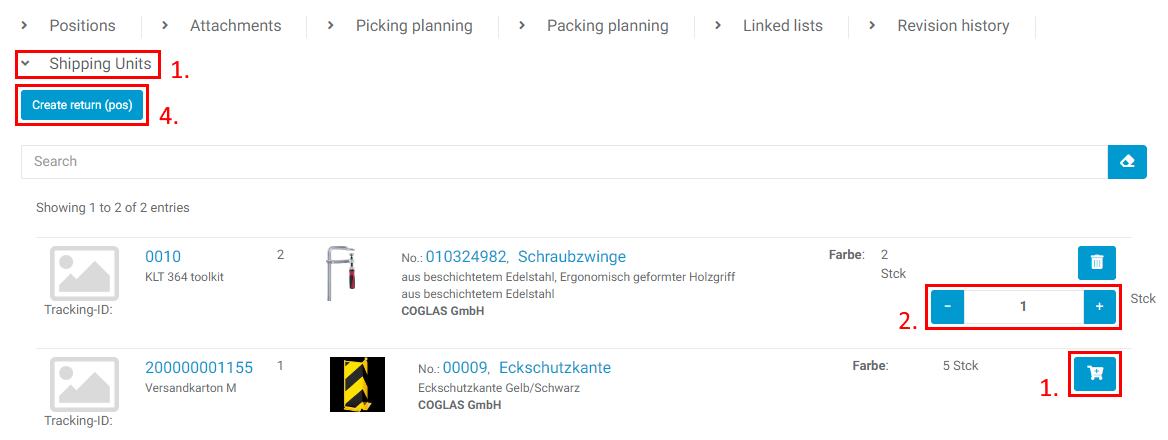
Order:
-
Internal creation of a purchase order for returns.
-
Order number = "RE-"+customer order+"-01".
-
Example = "RE-COMusterList01-01"
-
Delivery note:
-
Internal creation of a delivery note for the return.
-
Delivery note number = "RE-"+customer order+"-01".
-
Example = "RE-COMusterListe01-01"
-
-
Delivery note menu
-
Strategy = Use article master "Standard returns strategy" or GR "Standard".
-
Check the data and start the collection.
-
Manual collection
-
Selection of container details and quantity distribution
-
Create goods receipt
-
-
Automatic collection
-
Planning on containers of the article packaging units
-
Generation of a new barcode
-
Create goods receipt
-
Incoming goods:
-
Goods receipt menu
-
Goods receipt number = "RE-"+customer order+"-01-01"
-
Example = "RE-COMusterListe01-01-01"
-
Select [Checklist] if active.
-
Select [book] to post the goods receipt
-
Storage Transport:
-
Transport" menu
-
Scan the barcode of the storage unit.
-
Confirm transport to destination.
Returns stock:
-
Returns stock
-
Putaway according to standard strategy
-
Stock qualification GR date corresponds to the booking date.
Enter unplanned returns
Retrieve returns data:
-
Shopfloor menu
-
Article" display is active
-
Search for and select an item.
-
Set the returns quantity with the shopping basket.
-
Then [Add delivery note]
-
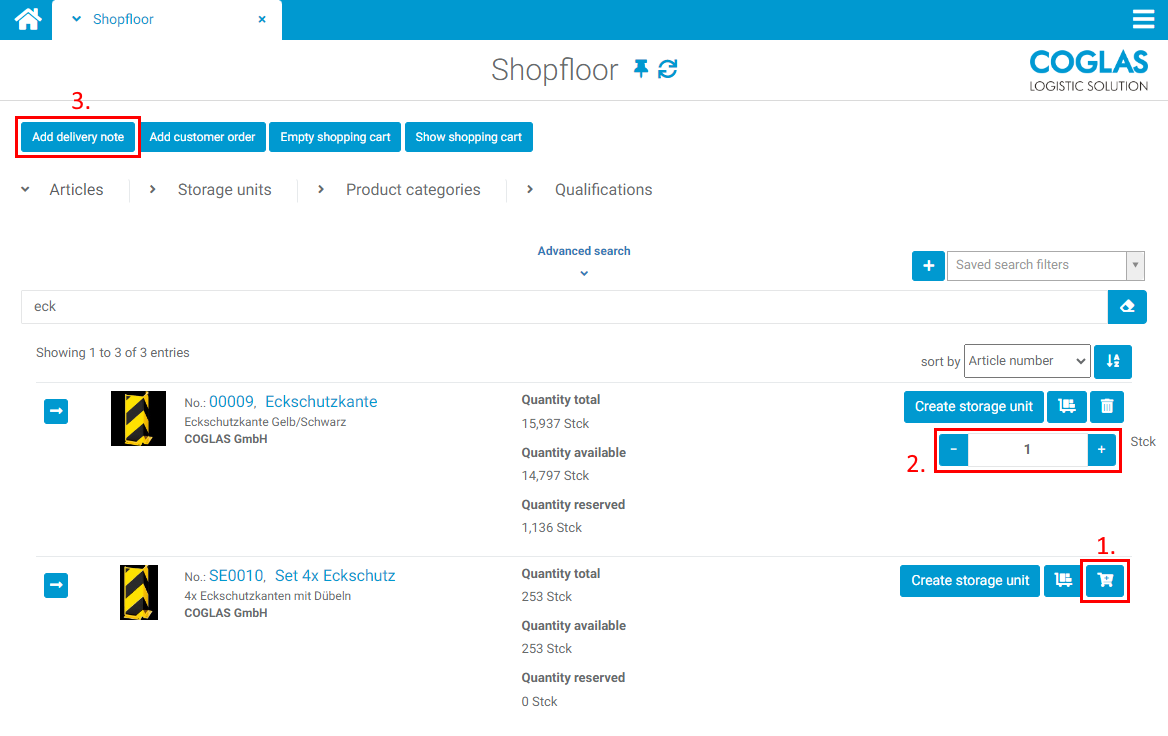
Order:
-
Not applicable
Delivery note:
-
Add delivery note" menu
-
Enter the number of the delivery note (generate number with ##+[TAB])
-
Select "Client" (mandatory field)
-
Select "Supplier" (mandatory field)
-
Select "Target strategy" (default = standard strategy)
-
Add delivery note
-
-
Delivery note menu
-
Delivery note number from input or number generation.
-
Example = DNMusterListe02
-
Check data and start collection
-
Manual collection
-
Selection of container details and quantity distribution
-
Creation of goods receipt
-
-
Automatic collection
-
Planning on containers of the article packaging units
-
Generation of a new barcode
-
Goods receipt system
-
-
Incoming goods:
-
Goods receipt menu
-
Goods receipt number = delivery note+"-01"
-
Example = "DNMusterListe02-01"
-
Select [Checklist] if active.
-
Select [Post] to post the goods receipt
-
Storage Transport:
-
Transport" menu
-
Scan the barcode of the storage unit.
-
Confirm transport to destination.
Returns stock:
-
Returns stock
-
Putaway according to standard strategy
-
Stock qualification GR date corresponds to the booking date.
→ back to COGLAS processes
→ back to COGLAS menu