
General
Remarks can be entered in various lists and master data. These are used to pass on information at different levels, such as customer orders, picking and packing notes, etc.
Comments can also be transferred via imports in the "Remarks" fields.
Customer Order - Picking
Remarks can be entered at header and item level in the customer order.
In the customer order header under the General tab, remarks can be entered for the order header, which are then displayed later in transport processing or picking. The same applies to remarks at item level, which are displayed when processing begins and can be displayed in picking after an item using the Remarks button or edited using Edit remarks.
Under the Transfer tab Additional comments can be entered, which are displayed in the corresponding processes:
-
Packing remarks
-
Loading remarks
-
Delivery remarks
Loading remarks and delivery remarks can be found in the Customer Order Overview report, as can the notes from the order header. The overview can be printed from the customer order by clicking the Print Overview button.
Example
Upon entering the Picking execution the remarks will be shown:
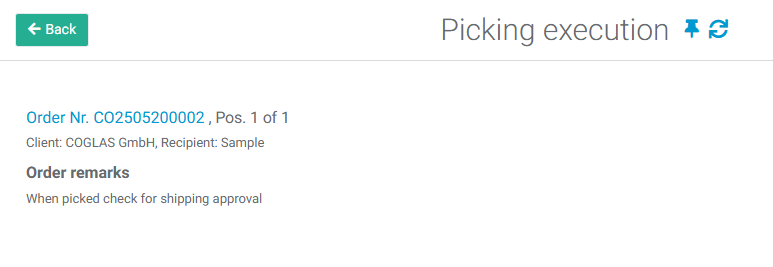
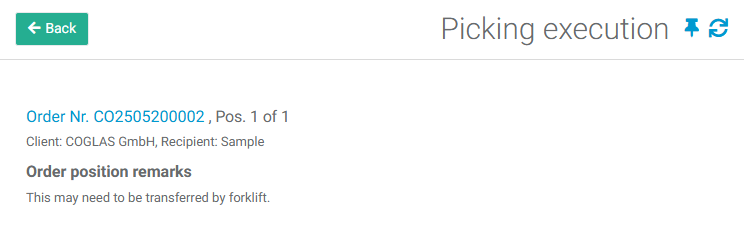
Note: Remarks will be displayed on separate screens. First, the header remarks will be shown, followed by the position remarks after hitting the Back button. To start the process, hit 'Back' again.
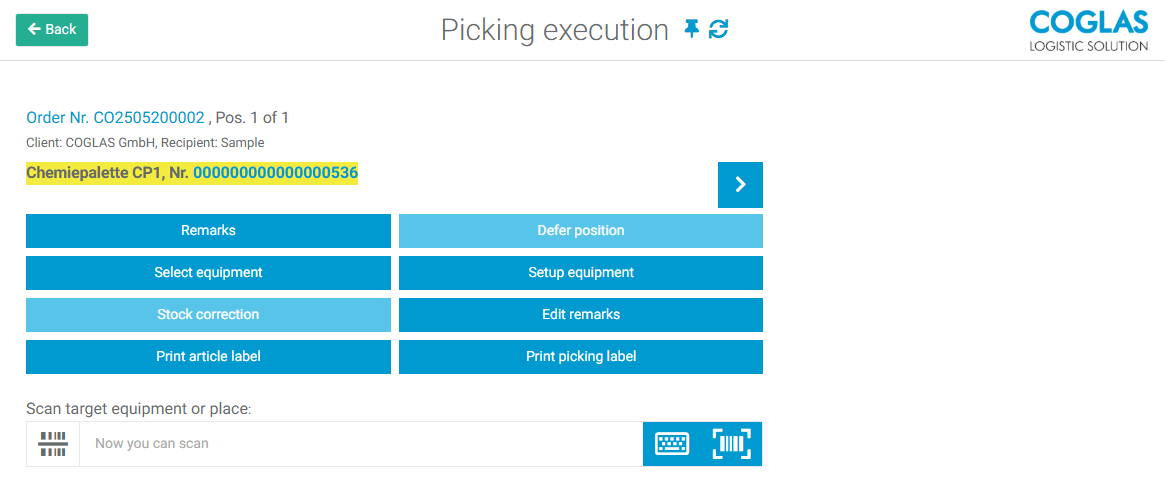
Once the picking position has been confirmed, you will be taken to the next screen where you can review or edit the remarks using the corresponding buttons.
Goods In
If remarks are used in goods receipt, they can be set at all levels:
-
GoodsIn Order (at header level, can be passed on to the delivery note)
-
DeliveryNote (at head and position level)
-
GoodsIn receipt
When transporting goods to the goods receiving area, corresponding position information is displayed when the storage units are scanned.
The remarks on the delivery note are also displayed again in the Delivery Note Overview report.
Article master data
In addition to remarks at list level, it is also possible to enter these directly in the article master data.
Here, the following notes can be set as default in the article master data under Process Control, which are then displayed in the processes:
-
Goods in receipt remarks
-
Picking remarks
-
Transport remarks
-
Packaging remarks
-
Loading remarks
→ back to COGLAS processes
→ back to COGLAS menu