
General
This function allows you to assign available transport orders to resources. It offers the option of specifying intermediate destinations as transfer points between the source and destination storage locations.
Transport menus
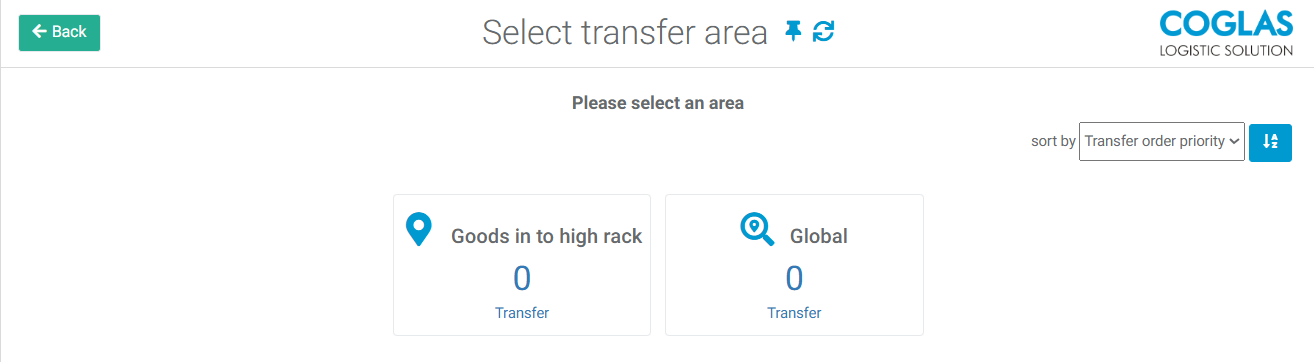
Transfer areas are maintained in Input Options → Transfer order excution menu
Zone type: Transfer Routing
Intermediate destinations are defined using the "Transport Routing" zone type. As with the "Storage Area Code," the zones are created with a unique name (Configuration › Strategies > Zone Options) and assigned to the respective node in the warehouse overview.
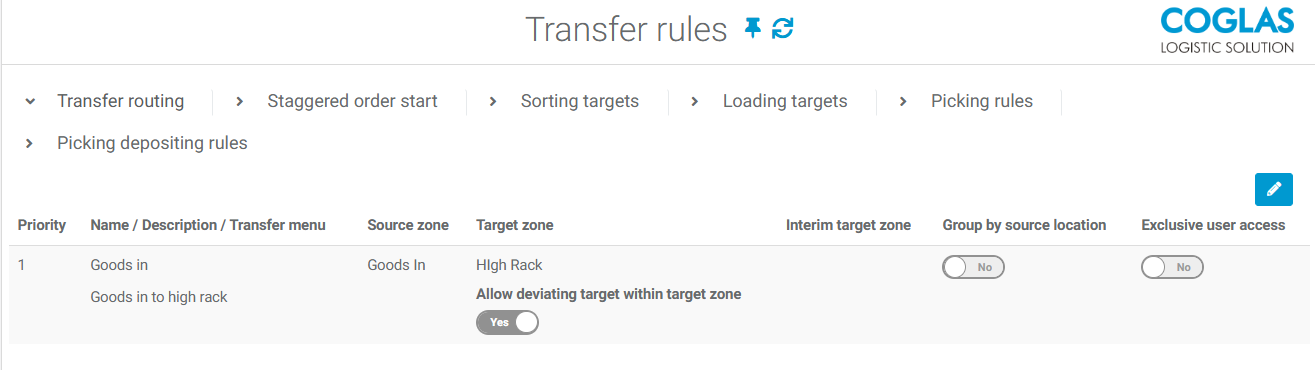
Transfer Routing
In the transport routing configuration (Transport → Transport Routing), a source zone and destination zone (plus an intermediate destination if the destination zone cannot be reached directly from the resource) are assigned to a resource.
The system checks the matrix in descending order for all current and future transport orders to ensure that the transfer and parameters match. When the first positive match is found, the transfer is sorted into the respective menu.
In the overview of transport orders → All categories, only the resources configured in "Transport Routing" are displayed.
Sorting targets
The aim is to enable the target staging area to be controlled at the customer order header depending on the carrier. The challenge with only one staging area is that, if there are several carriers, all orders are posted to one staging area. With multiple staging areas, the processes are easier to oversee.
Depending on the carrier, the relation, and the shipping tariff in the customer order header, each customer order can be assigned a specific staging area in COGLAS
COGLAS Options:
-
Client Options: Transfer → Enable sorting targets (restart required)
-
System: Input Options → Edit relation
-
Business Partners: Edit Shipping tariffs
-
Relation and shipping tariff can be added in the customer order header
System → Transfer rules → sorting targets
|
Field |
Description |
|
|---|---|---|
|
1 |
Priority |
The entries are checked in descending order from 1. |
|
2 |
Name |
Freely selectable. |
|
3 |
Description |
Brief description |
|
4 |
Carrier |
All business partners with partner type carrier |
|
5 |
Conditions |
Sorting in dependency of tariff / relation |
|
6 |
Strategy |
|
|
7 |
Move up/down |
Move position up/down. |
|
8 |
Remove |
Delete position. |
Configuration:
-
Activate storage option (sorting destinations) through customer support and specify carriers, relations (optional), and rates (optional)
-
COGLAS: System → Transport rules → Sorting targets: Editing priorities (check in descending order), names, carriers, dependencies (relation and tariff), and strategies (type: staging outbound)
-
Note: Each carrier can use the relation and/or tariff to have different staging areas as target points in COGLAS using the strategies.
Loading targets
Based on the sorting destinations, the loading destinations are used to link the previously defined staging areas (in sorting destinations) to the outbound gates. Automatic route creation and/or transport orders as well as successive loading are setting options for the loading destinations.
COGLAS Options:
-
Client Options: Transfer → Enable sorting targets (restart required)
-
Transfer rules → Sorting targets → Sorting targets for carriers created
System → Transfer rules → Loading targets
|
Field |
Description |
|
|---|---|---|
|
1 |
Priority |
The entries are checked in descending order from 1. |
|
2 |
Name |
Freely selectable. |
|
3 |
Description |
Brief description |
|
4 |
Settings |
AutoCreateTour
CreateTransferOrder
GradualLoadingMode
|
|
5 |
Load area |
Loading gate |
|
6 |
Move up/down |
Move position up/down. |
|
7 |
Remove |
Delete position. |
Configuration
-
Transfer rules → Sorting targets → Sorting targets for carriers created
-
COGLAS: System → Transfer rules → Loading targets: Editing priorities (check in descending order), names (specified from sorting targets, setting options:
-
Gradual loading: As soon as an order has the header status "Packed," transfer orders are created for all packages for loading.
-
Automatic tour creation: Generation of a tour as soon as there is no active or open tour to the carrier
-
Create transfer order: Automatic transfer order creation
-
-
loading area: Loading gate
→ back to COGLAS processes
→ back to COGLAS menu