
General
The service configuration plays a key role in integrating the data interface with the COGLAS message types. It defines the basic settings and parameters required to ensure seamless communication between the systems.
User Interface
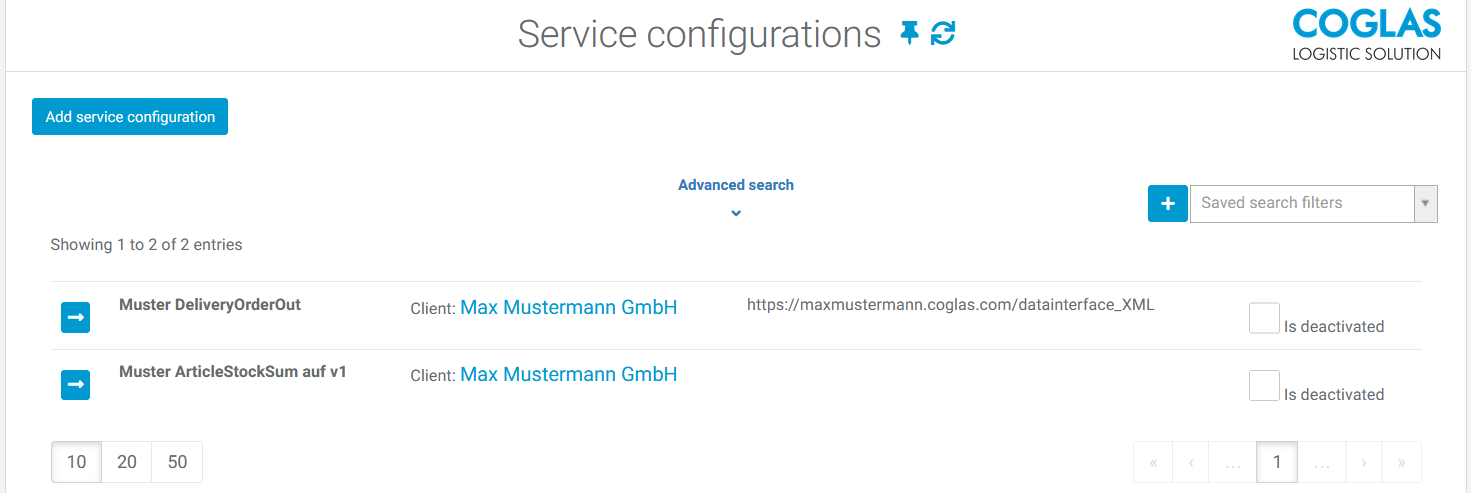
The service configuration menu must be entered manually. New profiles can be created for this purpose.
Menu path: System - Data Interface - Service Configurations
Service Configurations menu:
-
[Add service configuration] button = Create a new entry.
-
Advanced search = Search by field values and restrictions.
-
Display of various configuration profiles that have already been created. The fields Name, Client, Service URL, and the status Deactivated (Yes/No) are displayed.
Input options
|
Required fields |
Requirement |
Description |
|
|---|---|---|---|
|
1 |
Name |
YES |
Name of the service configuration |
|
2 |
Description |
No |
A brief description of the service configuration |
|
3 |
Client |
YES |
Client used for the message types |
|
4 |
Is deactivated |
No |
Checkbox to deactivate the service configuration |
|
5 |
Service URL |
No |
URL of the data interface folder with host name as prefix, e.g.: ‘https://xxx.coglas.com/datainterface_xml/’ |
|
6 |
Timeout |
No |
Time after the query times out |
|
7 |
Authentication scheme |
Default: None |
Authentication method via API or username & password. Options = None, API Key, Basic, and Client Credential
|
|
8 |
|
= API Key |
Authentication Web API Key:
|
|
9 |
|
= Basic |
Authentication Basic:
|
|
10 |
|
= Client credentials |
Authentication Client credentials:
|
Message type configurations: Configuration of message types with version number, automatic sending or retrieval via CURL
|
Optional fields |
Description |
|
|---|---|---|
|
1 |
Name |
Name of the message type without the version number. |
|
2 |
Version |
Specifies the version of the message type to be used. |
|
3 |
Is auto send |
Automatic sending of message types |
|
4 |
Is calloff |
Calling via CURL command |
|
5 |
Max items per message |
Specifies how many items are to be reported or retrieved with the message. Example:
Note: This may result in more files being reported or require multiple retrievals to send all the data. |
Feedback from COGLAS → ITSYSTEM
-
COGLAS expects a customer-side API interface with the name „**/api/DataInterface/ProcessMessageType“
-
„**/api/DataInterface/ProcessMessageType“ is automatically appended by COGLAS when directly addressing an endpoint of the web API.
-
A rewrite URL can be stored in the customer's own web server, e.g. IIS, if the endpoint looks different. Example:
<system.webServer>
  <rewrite>
    <rules>
      <rule name="Coglas2xxxer">
        <match url="^(?:api/datainterface/processmessagetype$"/>
        <action type="Rewrite" url="xxx/yyyy"/>
      </rule>
    </rules>
  </rewrite>
</system.webServer>
System role Web-API
-
To access the data interface, a user in COGLAS is required who has been assigned the role "Web API".
-
This user is used for the authentication process. The user's password and role are maintained in COGLAS. In addition, the service user is stored with their user name and password in the datainterface web.config to enable access.
Message types configuration
Under Message Type Configurations, you can specify the message type to be used and its version.
Since changes can be made to newer versions of a message type that affect the structure of the message, it is possible to select a specific version. This allows older message types to continue to be used while ensuring compatibility with existing systems.
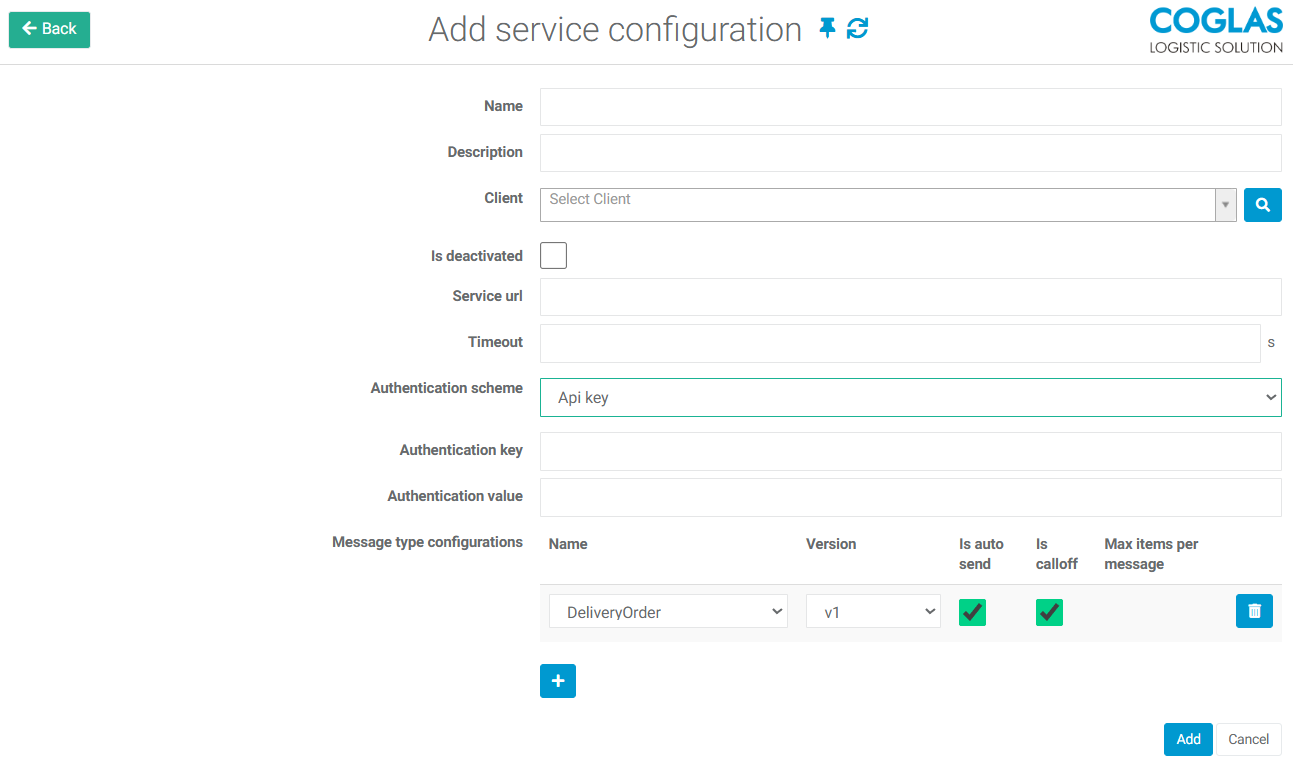
Detailed explanation:
-
The “Auto Send” option is used to specify automatic sending of the message type.
-
The “Is Calloff” option is used to specify whether the message type can be retrieved using the CURL command.
-
The “+” symbol allows you to add multiple message types for the individual service configuration.
Host feedback for successful receiving:
For correct data receipt by the host, an HTTP 200 successful status message is expected from the host. A specified format is expected for this.
If the format is correct, the interface history is set to ‘successful’.
If the format is incorrect or missing completely, the interface history is set to ‘unsuccessful’.
Expected format from the host for successful receipt of the feedback:
{
     return Ok(new { received = data, message = "Data received successfully!", Success = true });
}
Example
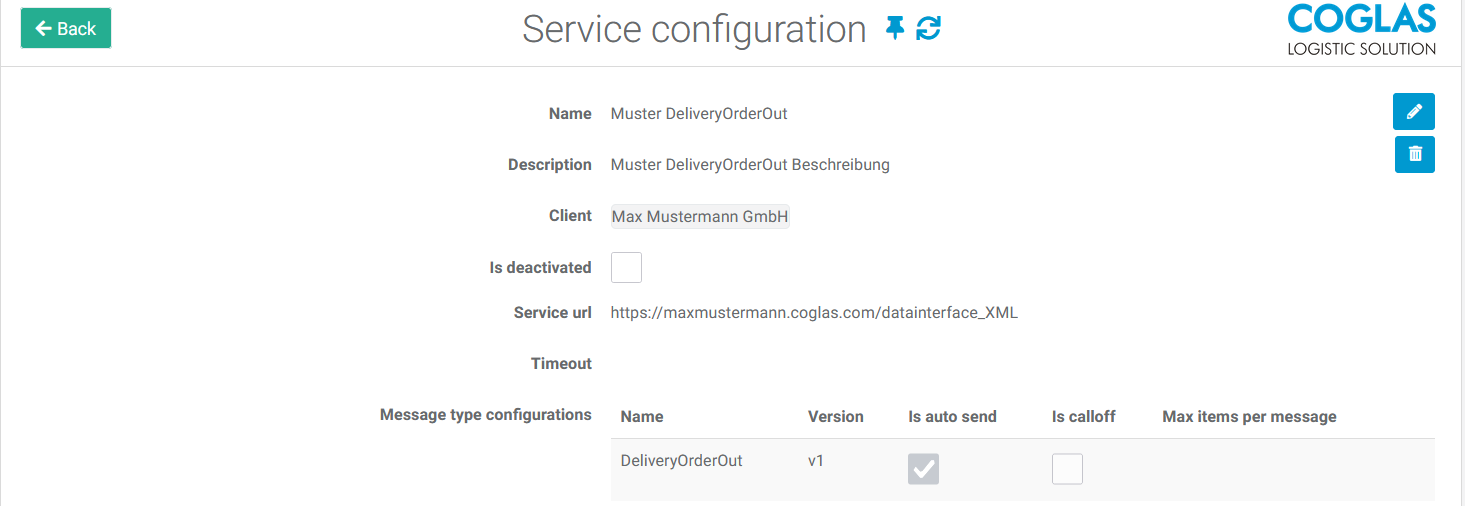
Example #1: Standard output to a file. For a goods issue posting, when the sales order reaches the “Done” status, the message type DeliveryOrderOut_v1 should be output to an XML file via the interface.
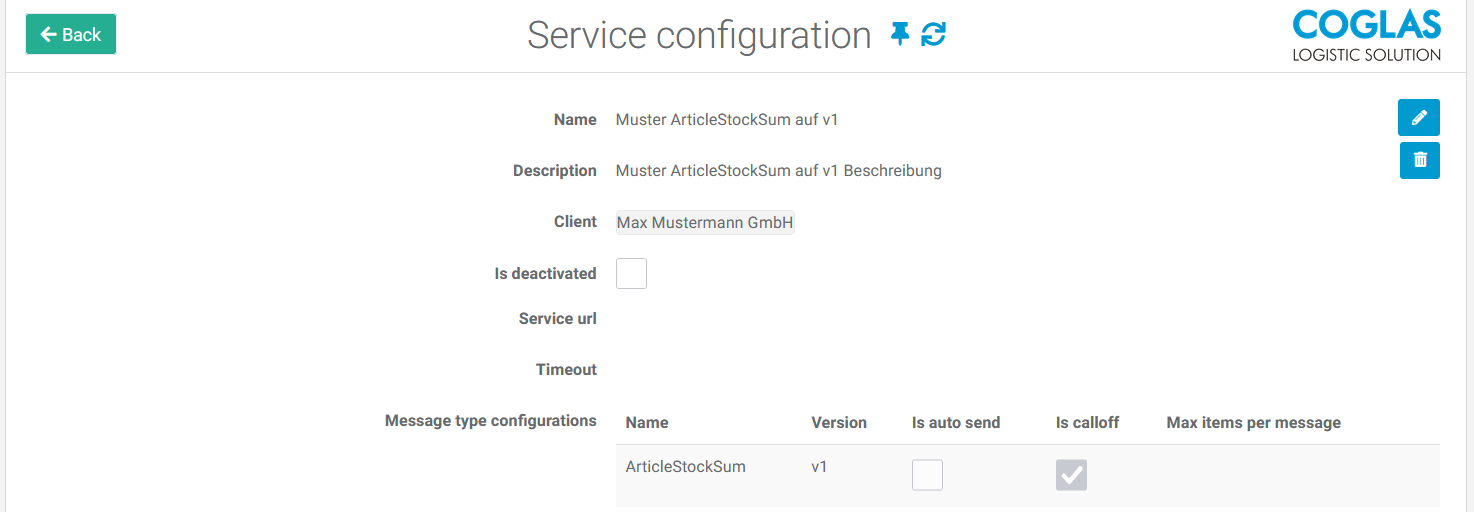
Example #2: When retrieving the message type ArticleStockSum, version v1 should be retained. To do this, the desired version is specified in the service configuration under the client entry and the message type configuration.
Warning message
|
Warning message |
Description |
|---|---|
|
Invalid URL |
The URL that has been entered does not correspond to a valid URL. e.g. https://xyz.coglas.com/datainterface_json/ |
|
Interface history entry unsuccessful |
The data arrives, but no successful entry is set in the interface. Then the response must be as follows: {
|
→ back to COGLAS processes
→ back to COGLAS menu