
General
The number range function describes the option of creating an individual barcode for SSCC/NVE or an individual invoice number according to specifications.
Storage unit barcodes will be created according to the number range for example during the collection of quantities in the delivery notes process.
Article Numbers will be created according to the number range when adding new articles and using “##” to automatically create article numbers.
The profile specifications require the "type" to determine the type of number. Furthermore, the business partner for whom the number generation rule is to be executed must be specified.
The other parameters define the details of the ID that are to be taken into account and used during generation.
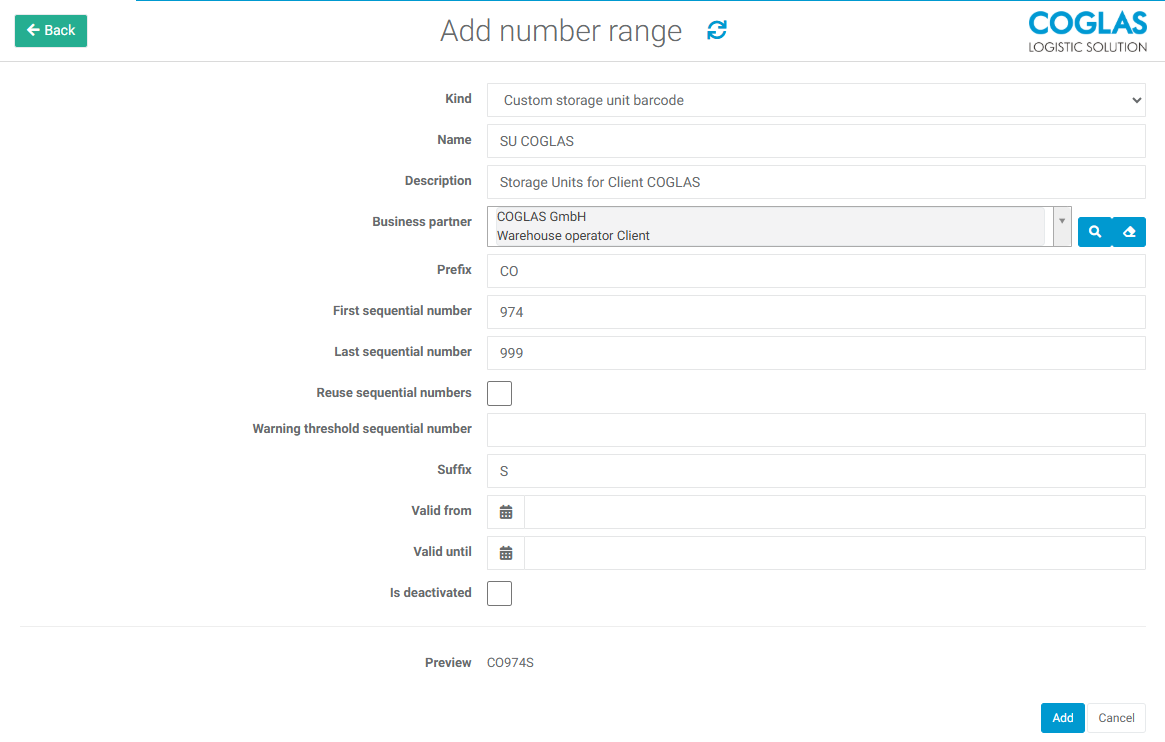
Add number range
via the button Add number range a new one can be specified, the following attributes can be set:
|
Input |
Description |
|---|---|
|
Kind |
Use of the number range Custom Barcode / Storage Units
Billing & Contract Invoice Number
SSCC
Article Number
Production Article Serial Number
Client SSCC
|
|
Name |
A name for the number range |
|
Description |
Brief description for what this is used e.g. SU for Client |
|
Business partner |
Various partner types are supported for selection of the appropriate business partner. |
|
Extension digit and GS1 company prefix |
Needed when creating SSCC according to GS1-Standards |
|
Prefix |
Used in:
Prefix to the sequential number |
|
First sequential number |
start of the number range (e.g. 001) |
|
Last sequential number |
end of the number range (e.g. 999) |
|
Reuse sequential numbers |
Checkbox, determines if number can be reused |
|
Warning threshold sequential number |
A warning will be given when the set threshold is reached. |
|
Suffix |
Used in:
suffix to the sequential number |
|
Valid from |
The date from which the range is valid. |
|
Valid until |
The date until which the range is valid. |
→ back to COGLAS processes
→ back to COGLAS menu