
General
The control center for shelf life warning times allows you to check the shelf life status of article stocks and take immediate action if blocking or stock transfer is necessary.
In addition, this control center provides a clear overview of all item stocks, which can be filtered according to their best-before date warning (Total shelf life warning).
Function
To access the "Shelf life warning time" interface, first open the system via the burger menu. Then select the "Total shelf life warning" option under the "Stock" menu item.
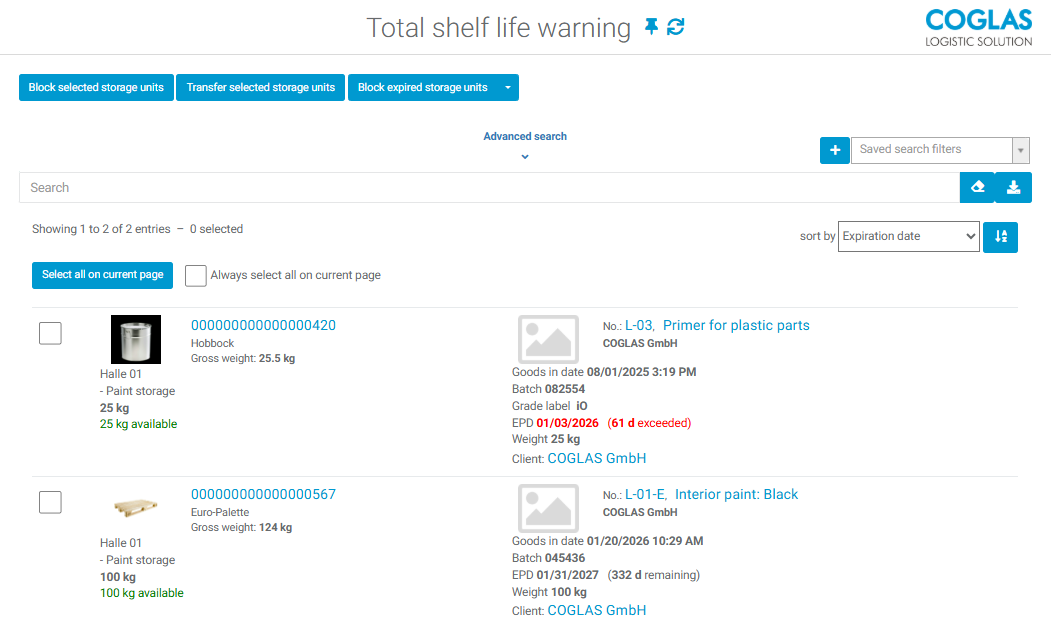
Explanation of the Buttons
|
Button |
Explanation |
|---|---|
|
|
The “Block Expired Storage Units” button locks all stocks for which the expiration date is reached or exceeded on the current day, regardless of the displayed list. Lock list with lock reason: Stock expired. |

|
Manually selected storage units (checkbox active) are blocked. The expiration date or expiration warning status does not matter. Blocking list with blocking reason: Stock expired. |

|
Manually selected storage units (checkbox active) are transferred. The storage unit transfer opens. Entry of the target storage location, target barcode, or strategy is possible. “Transfer” or “Transfer with strategy ” to proceed with the booking. |
Advanced Search

|
If the button Show all is activated, the list shows all stocks for which an expiration date (MHD) is entered and that meet the filter values:
|

|
Filter values are considered and only stocks are shown for which the warning date is reached or exceeded on the current day. |

|
Filter values are considered and only stocks are shown for which the expiration date is reached or exceeded on the current day. |
|
|
Free text search for individual words, numbers, character strings, etc. |
Excel Export

|
The Excel export outputs the display result in an Excel file. The prerequisite is that the “MHD Warning” is maintained and has been exceeded. The “remaining” stock is not output in Excel. Example: See Fig. 1: Shelf Life Warning Time The Excel export will only output the stock rows marked in red and yellow. |
Warning indication
The expiration date can appear in different colors to indicate how close the stock is to expiring.
The coloring indicates whether:
|
RED |
Stock is expired |
|
YELLOW |
Stock will expire soon |
|
BLACK |
Stock with remaining expiration date times |
→ back to COGLAS processes
→ back to COGLAS menu