
General
In the Replenishment by reorder level Form, you can create new replenishment orders as well as display and change existing orders. Replenishments can be combined in one order per client.
In each item of a replenishment order, the reorder point, the quantity to be transferred, and the desired strategy are specified for an article or product category.
Replenishment orders are automatically created by a background process and can be processed via the transfer process. A new function allows replenishment orders to be triggered only when there is a demand for the item based on open orders.
Prerequisites
The following requirements must be met in order to successfully create and execute replenishment orders:
-
Strategy source and target:
-
Input values for the storage area code may be required to create strategy sources and targets.
-
The storage locations from which the replenishment requirements are to be taken must be available in a strategy source.
-
The destination storage locations for replenishment must be available in a strategy target.
-
The source and target must be combined in a strategy of the kind replenishment.
-
-
Replenishment order position:
-
For storage locations to which automatic replenishment is to be delivered, a replenishment order item must be created for each article or product category.
-
There must be sufficient stock available at the source.
-
Free storage space must be available within the target zone.
-
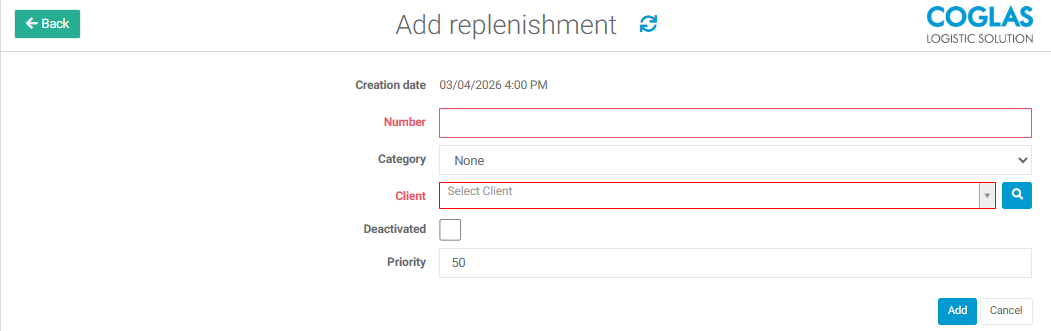
Add replenishment order
A replenishment order consists of several fields that are important for administration and execution:
|
Required field |
Description |
|---|---|
|
Creation date |
Generated automatically |
|
Number |
The user can enter an individual number or have the system generate a number by entering "##" in the number field. |
|
Client |
Client for whom replenishments are being delivered |
|
Optional fields |
Description |
|---|---|
|
Category |
A replenishment order category can be set. Input Options |
|
Deactivated |
Deactivates the replenishment order if checked, can be reactivated |
|
Priority |
The user can set the priority of the replenishment order. If this field is left blank, the lowest priority of the selected customer orders is adopted. |
Process description
The replenishment process is triggered after a new position has been created and saved in a replenishment order. The process in detail:
-
Checking the stock:
-
After saving a new position in the replenishment order, the item stock in the target zone is checked.
-
If the stock level falls below the minimum level due to a withdrawal posting, the replenishment process starts automatically.
-
-
Start replenishment process:
-
The quantity for replenishment is searched for in the available stock in the source of the strategy.
-
The destination storage location is either searched for in the strategy's target zone or defined by the triggering posting.
-
-
Reservations and transportation:
-
The replenishment quantity is reserved at the source and the replenishment transfer order is created.
-
→ back to COGLAS processes
→ back to COGLAS menu